
Futuremark SystemInfo 5.92.1497 | Size: 3.45 MB
Language: English
SystemInfo is a component used in many of our benchmarks to identify the hardware in your system. It does not collect any personally identifiable information. SystemInfo updates do not affect benchmark scores but you may need the latest version in order to obtain a valid score.
The most recent versions of our currently supported benchmarks will prompt you to install new SystemInfo updates. Alternatively, you can update SystemInfo yourself from this page.
Monitor your system and find hardware IDs
Futuremark SystemInfo can scan your computer and collect information regarding a series of services, processes and hardware performance.
The tool can easily export the result of the scan to an XML file in which you can view the current values for the system version, user, files, storage, memory and motherboard. You can also view several statistics and information on WMI, Setup APIs, power supplies, DirectX, CPU cores, plus single or multi-threaded activities.
This diagnostic tool can only offer you the system information, it does not flag errors, trigger alarms, nor does it repair or clean any irregularity. It does, however, offer you a comprehensive overview on the current state of your system.
System information and activity logs
Once installed, Futuremark SystemInfo creates several components that you can use with various benchmarks. The System Diagnostic tool allows you to collect system data, monitoring information of direct queries.
The GUI utility is simple to operate and features several tabs. The Log displays the task being performed and their status, but the actual results of the search are displayed, separately, automatically exported to an XML file, that you can inspect.
Advanced searching tools
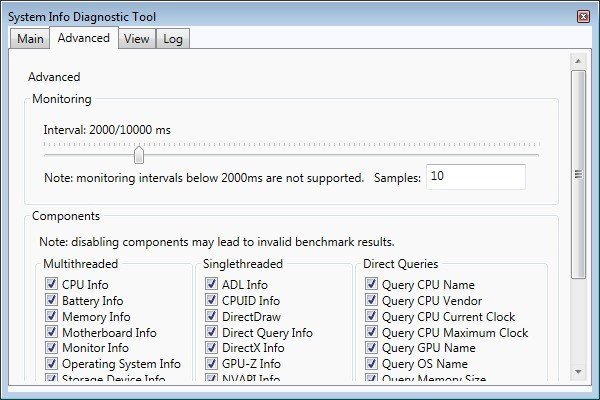
The Advanced tab in Futuremark SystemInfo allows you to filter the categories that you wish to investigate. Thus, you can select any of the parameters in single and multi-threaded activities, which are ADL info, DirectX, CPUID, NVAPI info, respectively CPU, battery, motherboard, monitor, OS or storage data.
Moreover, you can run direct queries on the CPU name, vendor, integrated clock, GPU name, if available, as well as details on each of the CPU cores. You can run standard diagnosis searches or find bottlenecks.
System Requirements: Windows 11, Windows 10, 8 , 7
rapidgator.net/file/7aece2d6bbacd3a1589193a375a32654/Futuremark_SystemInfo_5.92.1497.rar
nitroflare.com/view/565D7E9CDC57169/Futuremark_SystemInfo_5.92.1497.rar
